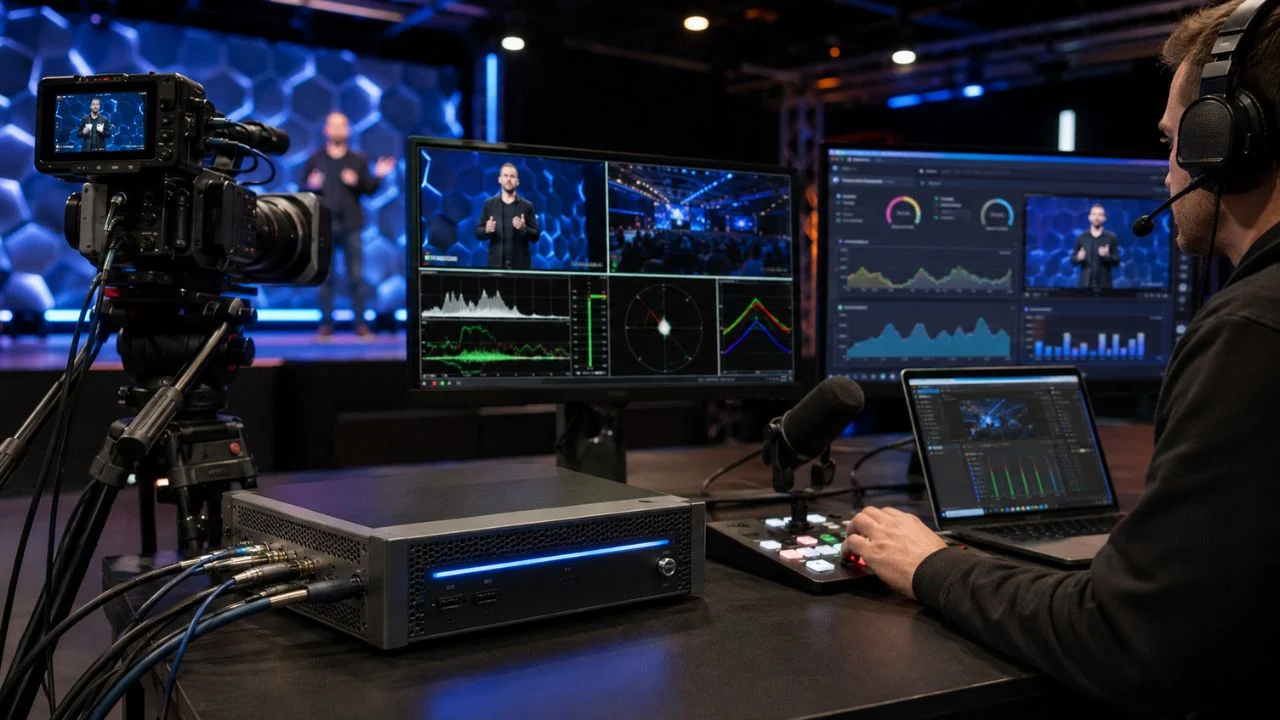

Streaming Encoders: A Complete Guide to Better Live Video
Streaming encoders are responsible for turning raw video and audio into compressed digital data that can travel across the internet. Without encoding, a live camera feed would require far more bandwidth than most connections and streaming platforms could handle. The encoder makes live broadcasting practical while trying to protect picture and sound quality.
Every livestream uses an encoder somewhere in its workflow. A gamer may use software running on the same computer as the game, while a television production may use dedicated broadcast hardware. Businesses, schools, houses of worship, sports organizations and creators may also rely on cloud or mobile encoders.
Choosing the right streaming encoder affects video sharpness, motion quality, latency, stability and production flexibility. An encoder that works well for a simple webcam presentation may not support a multi-camera sports event. The best option depends on the content, audience, internet connection and streaming destination.
Modern encoding is also changing as AV1, hardware acceleration, cloud production and low-latency streaming become more accessible. However, newer technology is not automatically the right choice for every broadcast. Understanding the full workflow helps you balance quality, compatibility, cost and reliability.
What Are Streaming Encoders?
A streaming encoder is a device, application or cloud service that compresses video and audio for live transmission. It receives an uncompressed or lightly compressed signal from a camera, capture card, microphone, media file or production system. The encoder then converts that input into a format accepted by a streaming platform.
Raw video contains a large amount of information. A single uncompressed high-definition feed may require far more data than a normal home or business internet connection can upload. Encoding removes repeated or less noticeable information so the video can be transmitted at a manageable bitrate.
The encoder also packages the compressed content for delivery through a streaming protocol. Depending on the workflow, it may send the feed using RTMP, RTMPS, SRT, RIST, HLS, WebRTC or another transport method. The receiving platform can then process and distribute the content to viewers.
Streaming encoders may also add production features such as scene switching, graphics, recording, audio mixing, captions and multiple output destinations. Basic products focus mainly on compression, while advanced systems can function as complete live-production platforms.
Why Video Encoding Is Essential for Live Streaming
Encoding reduces the bandwidth required to send live video over the internet. It allows a high-resolution camera signal to fit within the upload capacity available at a home, office, venue or remote production location. Without compression, most livestreams would stop, buffer or fail entirely.
The encoder also determines how efficiently available bandwidth is used. A better codec or encoding preset may preserve more detail at the same bitrate. This is particularly important for content containing fast movement, complex lighting, text, foliage, crowds or rapidly changing game scenes.
Video encoding also provides compatibility between the production source and the streaming platform. Cameras produce signals in various resolutions, frame rates and formats, while platforms accept specific codecs and delivery settings. The encoder translates the source into an acceptable stream.
A stable encoder can protect the entire viewing experience. Even an expensive camera cannot compensate for overloaded hardware, incorrect bitrate settings or an unstable output. Reliable encoding is therefore just as important as cameras, microphones, lighting and internet connectivity.
How a Streaming Encoder Works
The workflow begins with video and audio capture. A camera may connect through HDMI, SDI, USB, NDI or another interface, while microphones enter through a mixer, audio interface or camera input. Capture hardware converts these signals into data the encoder can process.
The encoder analyzes each video frame and looks for information that can be compressed. Instead of describing every pixel independently, it may store one complete image and then record only the changes that occur in following frames. This greatly reduces the amount of data required.
Audio is compressed separately through a codec such as AAC or Opus. The encoded audio and video are synchronized and placed inside a container or live stream. Correct synchronization is essential because even a small delay between speech and lip movement can distract viewers.
Finally, the encoder sends the stream to an ingest server operated by a platform, content delivery network or private streaming service. The platform may create additional quality levels before delivering the video to viewers. Monitoring continues throughout the broadcast to detect dropped frames, disconnections and bitrate problems.
Hardware Streaming Encoders
A hardware streaming encoder is a dedicated physical device designed to capture, compress and transmit video. It may be a small portable unit, a rack-mounted broadcast system or an integrated camera encoder. Hardware products often use specialized chips that perform video compression efficiently.
Dedicated encoders can offer strong reliability because they are not sharing resources with gaming, editing, web browsing or unrelated computer applications. Their operating systems and controls are usually focused on broadcasting. This reduces the number of processes that could interrupt a livestream.
Hardware encoders are widely used for live sports, conferences, television contribution, houses of worship and professional events. Many models provide SDI or HDMI inputs, redundant power, network bonding, local recording, remote monitoring and support for secure contribution protocols.
The main disadvantage is cost and reduced flexibility compared with software. A hardware unit may support only a limited number of inputs, resolutions or codecs unless upgraded. Buyers should confirm current platform compatibility and future requirements before investing.
Software Streaming Encoders
A software encoder is an application that runs on a computer or mobile device. Popular examples allow users to capture cameras, screens, applications, graphics and media files within one production interface. This makes software encoding attractive for creators who need flexibility.
Software encoders can offer scene switching, overlays, browser sources, transitions, virtual cameras, audio filters, plugins and local recording. Users can often update the application or add functionality without replacing physical equipment. This keeps the workflow adaptable as production needs change.
The performance of a software encoder depends on the computer. Encoding can use the central processor, the graphics processor or a dedicated media engine built into the hardware. An underpowered system may experience skipped frames, overheating, crashes or reduced game performance.
Software encoding is often the most affordable way to begin livestreaming. However, the computer should be tested under realistic conditions before an important event. A setup that works with one camera may struggle after additional scenes, animations, browser sources and high-resolution inputs are added.
Hardware Encoding vs Software Encoding
The term hardware encoding can also describe the use of a dedicated encoding engine inside a graphics card or processor. Technologies such as NVENC, Quick Sync, Video Core Next and Apple’s media engines compress video without placing the full workload on the main CPU.
CPU-based software encoding, commonly associated with encoders such as x264, can provide detailed control over compression. Slower presets may produce stronger quality at a particular bitrate, but they require more processing power. This can make them difficult to use alongside demanding games or production applications.
Modern GPU encoding has improved considerably and is usually the practical choice for single-computer streaming. It keeps the CPU available for the game, video conferencing software, graphics or other tasks. It can also support multiple encoding sessions on suitable hardware.
The best decision depends on the system and content. A powerful dedicated streaming computer may handle CPU encoding effectively, while a gaming computer may perform better with GPU encoding. Run motion-heavy tests and monitor system usage instead of choosing solely from theoretical comparisons.
Cloud Streaming Encoders
A cloud encoder processes video on remote infrastructure rather than relying entirely on equipment at the production location. The source feed is uploaded to a cloud service, where it can be encoded, transcoded, packaged, recorded and distributed to viewers.
Cloud encoding is useful when an organization needs several output resolutions or delivery formats. Instead of producing every version locally, the broadcaster sends one high-quality contribution feed to the cloud. The service creates the required streaming ladder for different devices and connection speeds.
A cloud workflow can also support remote production. Producers, graphics operators and technical teams may control a broadcast from different locations. This reduces the amount of equipment and staff that must travel to a venue, although stable connectivity becomes extremely important.
Pricing is usually based on processing time, output resolution, data transfer, storage or delivered viewing. Cloud encoding can scale quickly for occasional large events, but ongoing high-volume use may become expensive. Organizations should model the full cost rather than comparing only the monthly subscription.
On-Premises and Hybrid Encoding
On-premises encoding keeps the processing equipment within a studio, venue, data center or business facility. It gives the organization direct control over hardware, network paths, security and operating procedures. This model is common where predictable performance or data control is essential.
A hybrid workflow combines local and cloud processing. The local encoder may create a reliable contribution feed and backup recording, while a cloud service handles transcoding, captions, distribution or multi-platform delivery. This spreads responsibility across two layers.
Hybrid encoding can improve resilience when carefully designed. If one destination fails, the local system may continue recording or switch to another service. The cloud can also add capacity without requiring the organization to purchase enough hardware for its largest possible event.
The trade-off is greater workflow complexity. Teams must understand how local equipment, internet paths, cloud services and distribution platforms interact. Monitoring should cover the complete chain rather than confirming only that the local encoder appears active.
H.264 for Live Streaming
H.264, also known as AVC, remains the most widely compatible video codec for livestreaming. It is supported by major streaming services, browsers, mobile devices, televisions, editing tools and hardware encoders. This broad support makes it a dependable default for many workflows.
The codec can deliver good results at common resolutions such as 720p and 1080p. It is particularly practical when the stream must reach older devices or several platforms simultaneously. Most streaming software also provides well-tested H.264 presets.
H.264 is less efficient than newer codecs at equivalent visual quality. It may require a higher bitrate than HEVC or AV1 to preserve the same amount of detail. This becomes more noticeable with 4K video, high frame rates and complex movement.
Despite this limitation, compatibility often matters more than maximum compression efficiency. A technically efficient stream has little value when a target platform cannot ingest it or viewers cannot decode it. H.264 remains the safest starting point when requirements are uncertain.
HEVC or H.265 Streaming
HEVC, also called H.265, was developed to provide stronger compression than H.264. It can preserve high-resolution video with less bandwidth, making it useful for 4K, HDR and contribution workflows. Many newer cameras, phones, televisions and professional encoders support it.
The codec can reduce the upload bitrate required for a given level of quality. This may help broadcasters working from locations with limited bandwidth. It can also reduce storage and distribution demands when the complete delivery system supports HEVC.
Compatibility and licensing have slowed its universal use for livestreaming. Some platforms accept HEVC only through particular ingest methods, and older browsers or devices may not decode it reliably. Production teams must check every destination rather than assuming support.
HEVC can be a strong option for sending a high-quality feed to a cloud transcoder or supported platform. The service can then create viewer-friendly output formats. This contribution approach gains compression benefits without requiring every audience device to receive HEVC directly.
AV1 Streaming
AV1 is a newer video codec designed to deliver better compression efficiency than H.264 and, in many situations, HEVC. It can preserve more visual detail at a limited bitrate, making it attractive for high-resolution video and bandwidth-sensitive livestreams.
Early AV1 encoding required heavy CPU resources, which limited real-time use. Newer graphics cards and processors include dedicated AV1 encoding hardware, making the codec more practical for creators and production teams. Software and platform support has also continued to expand.
AV1 is especially useful when image quality at a restricted bitrate is the main priority. Detailed game scenes, sports, concerts and high-resolution productions may benefit from its efficiency. However, the actual result depends on the encoder implementation and chosen settings.
Compatibility should still be verified before choosing AV1. Not every live platform, editing system, hardware decoder or multi-streaming service accepts it in every workflow. H.264 remains a sensible fallback until the complete production and distribution chain supports AV1 reliably.
How to Choose the Right Video Codec
Begin with the requirements of the destination platform. Confirm which codecs, resolutions, frame rates, profiles and ingest protocols it currently accepts. Platform support can change, so settings should be reviewed before major events rather than copied permanently from an old tutorial.
Next, examine the available encoding hardware. A computer may support H.264 encoding but lack a dedicated AV1 engine. Attempting software AV1 encoding on unsuitable hardware can overload the system and create an unstable broadcast.
Consider the audience and playback environment. Internal company viewers using managed devices may support a newer codec consistently, while a public event may need to reach a wide range of phones, televisions and browsers. Broader audiences usually require safer compatibility choices.
Finally, compare the visual result at the bitrate you can sustain. Record test clips containing the same motion and detail as the planned livestream. Evaluate blocking, blur, text clarity, color gradients and motion rather than choosing a codec only because it is newer.
Resolution, Frame Rate and Bitrate
Resolution describes the number of pixels in each video frame. Common streaming resolutions include 720p, 1080p and 2160p or 4K. Higher resolution can produce more detail, but it also requires greater encoding power, bitrate and upload capacity.
Frame rate describes how many frames are displayed each second. Thirty frames per second is suitable for presentations, interviews and many general broadcasts. Sixty frames per second can make gaming, sports and other fast movement appear smoother.
Bitrate is the amount of encoded data sent each second. Increasing it can preserve more detail, but only when the platform, internet connection and viewer delivery system can support the higher rate. Excessive bitrate may create instability without producing a noticeable improvement.
These settings must be balanced together. A low bitrate spread across 4K at 60 frames per second may look worse than a well-encoded 1080p stream. Choose the highest combination that remains stable and visually convincing under real production conditions.
Constant vs Variable Bitrate
Constant bitrate, or CBR, aims to maintain a relatively steady data rate throughout the stream. Many live platforms recommend it because predictable output is easier to ingest, monitor and distribute. CBR is commonly used for public livestreaming.
Variable bitrate, or VBR, changes the amount of data according to scene complexity. A static speaker may require less data, while a fast-moving sports scene receives more. This can improve overall efficiency when the transport and destination support changing rates.
True encoding behavior is more complex than the names suggest. A CBR encoder may still vary within a controlled buffer, while VBR can be limited by average and maximum targets. Buffer settings influence how aggressively the encoder responds to complex moments.
For most creators, the destination platform’s recommendation should take priority. CBR is generally the practical choice for a direct live upload, while VBR is more common for recording, file delivery and controlled contribution workflows.
Keyframes, GOP and B-Frames
A keyframe is a complete video frame that does not depend on earlier frames. Other frames store changes relative to surrounding images, making compression more efficient. Streaming platforms use keyframes to begin decoding and switch between quality levels.
The interval between keyframes is often expressed in seconds or as a group of pictures, known as a GOP. Many platforms expect a regular interval, commonly around two seconds. An incorrect interval may cause warnings, delayed playback or unreliable transcoding.
B-frames improve compression by referring to both earlier and later frames. They can provide better quality at a given bitrate, but they also add processing and delay. Low-latency workflows may limit or disable them to reduce the time required to produce each frame.
Advanced users can adjust GOP structure, reference frames and encoder look-ahead. However, changing these values without understanding the destination can cause compatibility problems. Platform-tested defaults are usually safer than copying highly specialized settings.
Streaming Protocols and Their Roles
A codec compresses the video, while a protocol transports it between systems. The two terms describe different parts of the workflow. H.264 may be carried through RTMP, SRT, HLS or another supported protocol depending on the production design.
RTMP has remained a common method for sending live video from an encoder to a streaming platform. It is widely supported and relatively simple to configure. RTMPS adds transport encryption, making it preferable when the destination supports it.
SRT and RIST are designed for reliable video contribution across unpredictable networks. They can recover lost packets and adapt to network conditions, making them useful for remote production, sports venues and professional point-to-point transmission.
HLS is widely used for viewer playback and can also serve as an ingest method in selected workflows. WebRTC focuses on highly interactive communication with very low delay. The correct protocol depends on whether the feed is being contributed, processed, distributed or used for real-time conversation.
Understanding Streaming Latency
Streaming latency is the delay between an event happening at the source and appearing on a viewer’s screen. It includes camera processing, encoding, network transmission, cloud processing, player buffering and device decoding.
A normal broadcast may tolerate several seconds of delay, while auctions, betting, remote interviews and interactive lessons require faster delivery. Reducing latency usually decreases the amount of buffering available to hide network problems.
Encoding choices affect delay. Longer GOP structures, additional B-frames, complex look-ahead and heavy processing may improve compression but increase latency. Low-latency presets trade some efficiency or quality for faster output.
Choose latency according to the audience experience rather than always selecting the lowest setting. A stable stream with moderate delay is often better than an unstable ultra-low-latency feed. Interactive events should also test communication delay from both directions.
Audio Encoding for Livestreams
Audio quality strongly influences how viewers judge a livestream. Audiences may tolerate a slightly soft image, but they often leave when speech is difficult to understand. The encoder must compress and synchronize sound as carefully as video.
AAC is widely used because it offers strong compatibility across streaming platforms and devices. Opus is highly efficient and common in WebRTC and interactive communication systems. The destination determines which codec, sample rate, channel configuration and bitrate should be used.
Speech-focused broadcasts do not always need extremely high audio bitrates. Clean microphone placement, controlled room noise and proper levels can improve clarity more than simply increasing the bitrate. Music and stereo events generally need more audio data.
Monitor the output after encoding rather than listening only to the mixer. Clipping, channel reversal, synchronization errors or routing problems may appear later in the chain. Use headphones and platform monitoring during testing and throughout critical events.
Adaptive Bitrate Streaming and Transcoding
Adaptive bitrate streaming gives viewers several versions of the same live content. A player automatically chooses a suitable resolution and bitrate based on the viewer’s device, screen and connection. It may switch levels as network conditions change.
Creating these versions is known as transcoding. A platform can receive one high-quality contribution stream and produce lower-quality renditions such as 1080p, 720p, 480p and 360p. This makes the broadcast accessible to viewers with different internet speeds.
Not every account or streaming service guarantees the same transcoding availability. Creators should confirm whether the destination will generate multiple qualities. Without transcoding, viewers may be forced to receive the exact bitrate sent by the encoder.
Organizations operating their own streaming platform need enough processing capacity to generate the complete bitrate ladder. Cloud transcoding can provide flexible capacity, while dedicated systems may offer more predictable long-term costs for continuous broadcasting.
Multi-Bitrate and Multi-Platform Encoding
Some encoders can generate several outputs simultaneously. One stream may be optimized for a primary platform, while another uses a different resolution or bitrate for a secondary destination. This is known as multi-encoding or simulcasting.
Multi-platform streaming can expand audience reach across video platforms, social networks, company websites and private destinations. However, sending separate streams directly from the venue multiplies upload bandwidth and encoding demands.
A restreaming service can receive one feed and distribute it to several platforms. This reduces the outbound bandwidth needed at the source. It may also centralize scheduling, monitoring and platform authentication.
Each destination may have different technical and content requirements. One platform may accept AV1 or HEVC, while another expects H.264. A successful multi-stream workflow should use compatible settings or create separate outputs where necessary.
Streaming Encoders for Gaming
Game streaming requires the encoder to operate alongside a workload that may already use most of the graphics processor and CPU. A dedicated hardware encoding engine can reduce competition for resources, but the complete system still needs performance headroom.
Fast movement, detailed textures and particle effects are difficult to compress. A bitrate that looks clean during a static menu may develop blocking during intense gameplay. Test the most demanding scenes rather than evaluating only an easy section.
A single-computer gaming setup is affordable and convenient. A two-computer setup separates gaming from encoding and production, offering greater isolation. However, it adds capture hardware, audio routing, cables, power use and troubleshooting complexity.
Choose settings that protect consistent frame delivery. A slightly lower resolution with stable encoding usually looks better than a higher-resolution stream that stutters. Viewers notice freezing and skipped frames more quickly than a modest reduction in image sharpness.
Encoders for Webinars and Business Events
Webinars usually contain speakers, slides, screen sharing and pre-recorded media rather than continuous fast movement. This allows efficient encoding at moderate frame rates and bitrates. Text clarity and reliable audio should receive the highest priority.
A software encoder can combine cameras, presentation slides, remote guests, lower-thirds and branded backgrounds. Hardware encoders may be preferred for executive broadcasts or large company events where reliability and simple operation are important.
Business events may also require secure destinations, access control, captions, recording and internal distribution. The encoder must fit within the broader video platform rather than functioning as an isolated device. Compliance and data handling can influence product selection.
Redundancy should match the importance of the event. A major investor presentation may justify backup power, internet, encoding and recording. A routine internal update may need only a tested computer and an alternative communication channel.
Encoders for Churches and Community Events
Houses of worship and community organizations often need systems that volunteers can operate consistently. Complex features provide little value when the workflow is too difficult for the available team. Simplicity, clear controls and saved presets are important.
A typical setup may include several cameras, presentation slides, music, speech and audience sound. The encoder must handle audio carefully because levels can change significantly between a quiet speaker and a live band.
Hardware switcher-encoders can combine production and streaming inside one unit, while software provides greater graphics and scene flexibility. The right choice depends on the number of operators, camera connections, budget and desired production style.
Remote support and automatic recovery can be valuable when technical specialists are not present for every event. Document the startup, monitoring and shutdown process so the broadcast does not depend entirely on one experienced volunteer.
Encoders for Sports and Live Events
Sports video contains constant movement, detailed backgrounds and sudden camera changes. These scenes are demanding for compression and usually benefit from higher frame rates and carefully selected bitrates. Encoder quality becomes especially visible during fast action.
Professional sports workflows may use SDI connections, embedded audio, replay systems, graphics engines and synchronized cameras. Hardware encoders are common because they provide predictable inputs, low delay, redundant networking and remote management.
Outdoor and temporary venues introduce unstable connectivity. SRT, RIST, bonded networks or cellular contribution systems can protect the feed. Local recording provides an additional copy when the live connection becomes unreliable.
Testing should reflect the real venue and production load. Network performance during an empty setup period may differ from conditions after spectators arrive and begin using cellular services. A backup connection should use a genuinely separate path whenever possible.
Portable and Mobile Streaming Encoders
Portable encoders are designed for field reporting, travel, sports, events and mobile production. They may include built-in batteries, camera mounting, cellular modems, Wi-Fi, Ethernet and local recording.
Network bonding combines several connections, such as cellular providers, Wi-Fi and wired internet. The system divides or duplicates data across those paths to improve reliability. Effective bonding requires a compatible receiving service or server.
Mobile encoders must balance battery life, heat, weight and processing power. High-resolution encoding and several cellular connections can consume energy quickly. Field teams should test runtime and carry suitable power options.
Environmental protection also matters. Direct sunlight, rain, dust and poor ventilation can affect equipment. A technically advanced encoder cannot remain reliable when placed in an unsuitable operating environment.
Essential Streaming Encoder Features
Input support should match current cameras and future expansion. Check the number of HDMI, SDI, USB, network and audio connections. Confirm whether the encoder can accept the required resolution, frame rate, color depth and embedded audio.
Codec and protocol support should be evaluated across the complete workflow. A product may encode AV1 but lack the protocol required by the destination. Another may support SRT only through a paid license or optional firmware.
Operational features can include local recording, graphics, scene switching, remote control, scheduling, automatic reconnection, redundant outputs and health monitoring. Choose functions that solve actual production needs instead of paying for an impressive but unused specification list.
Vendor support and update history are equally important. Streaming platforms and security requirements change over time. An encoder that no longer receives firmware or software updates may lose compatibility even when its physical hardware remains functional.
Choosing the Correct Upload Speed
Your internet upload capacity must comfortably exceed the total bitrate being transmitted. The requirement includes video, audio and protocol overhead. Additional room is needed to handle normal network variation without dropping data.
A practical approach is to keep a significant safety margin above the stream bitrate. For example, a connection barely capable of reaching the chosen rate during one speed test is not reliable enough for a long broadcast. Consistency matters more than the highest result.
Use a wired Ethernet connection whenever possible. Wi-Fi can work, but interference, distance and other devices may cause sudden changes. Cellular connections also vary according to signal, congestion and network management.
Test the connection at the venue, on the same day and around the expected event time. Monitor sustained upload performance, packet loss and jitter rather than relying only on a short general speed test.
How to Set Up a Streaming Encoder
Begin by connecting the camera and audio sources. Confirm that the encoder recognizes the correct resolution, frame rate and sound channels. Correct these source settings before configuring the streaming output.
Create the destination inside the encoder using the platform’s server information and stream key or authenticated connection. Protect stream credentials because anyone with access may be able to broadcast to the account.
Set the codec, resolution, frame rate, bitrate, keyframe interval and audio values according to the destination’s current recommendations. Select the correct network interface and enable automatic reconnection when appropriate.
Run a private or unlisted test containing real movement, slides, music, microphones and scene changes. Watch the stream on several devices and review the encoder log. Do not treat a brief preview inside the production software as a complete test.
Monitoring Encoder Performance
Important encoder statistics include rendered frames, encoded frames, dropped network frames, bitrate, processing delay and system utilization. Each metric points to a different type of problem. Understanding the difference speeds up troubleshooting.
Rendering lag usually means the production application or graphics processor cannot prepare frames quickly enough. Encoding lag suggests the chosen encoder settings exceed available processing capacity. Network drops indicate that the upload path cannot send data reliably.
Monitor temperature and power when using portable equipment or high-performance computers. Thermal throttling may appear only after the encoder has operated for an extended period. A short setup test may not reveal the issue.
Platform-side monitoring is also essential. A local encoder may show a healthy output even when the ingest service is receiving errors. Watch both ends of the connection and keep a local recording for later review.
Common Streaming Encoder Problems
Dropped frames often result from insufficient or unstable upload capacity. Lower the bitrate, use Ethernet, close unnecessary network activity and test a different connection. Increasing encoder quality settings will not solve a network problem.
Encoding overload occurs when the CPU, GPU or dedicated media engine cannot process frames in real time. Reduce the resolution, frame rate or preset complexity. Also check whether several applications are competing for the same resources.
Audio and video synchronization problems may come from different device delays, sample rates or processing chains. Apply measured synchronization offsets rather than adjusting randomly. Recheck the delay after changing cameras, capture cards or audio equipment.
A rejected stream usually indicates an incorrect key, server, codec, profile, protocol or platform setting. Read the platform error message and compare every output value with current ingest guidance. Repeatedly restarting without changing the incorrect setting rarely helps.
Security for Streaming Encoders
Streaming credentials should be treated like passwords. Do not display them during screen sharing, place them inside public documents or store them in unprotected files. Regenerate a key when accidental exposure is suspected.
Use encrypted transport such as RTMPS or secured contribution protocols where supported. Encryption protects the feed while it travels between the encoder and receiving service. Private networks and authenticated destinations provide additional protection for internal broadcasts.
Hardware encoders should receive firmware updates, strong administrator passwords and restricted network access. Disable unused services and avoid exposing control panels directly to the public internet. Place professional encoding equipment inside an appropriately managed network.
Cloud and software accounts should use multifactor authentication and limited user permissions. Production staff may need scheduling or monitoring access without full account ownership. Access reviews become especially important after employees or contractors leave.
How Much Do Streaming Encoders Cost?
Software encoders range from free open-source applications to professional subscription platforms. The computer, capture cards, audio interfaces and production accessories may represent a larger expense than the software itself.
Entry-level hardware encoders may cost several hundred dollars, while professional multi-channel systems can cost thousands or considerably more. Features such as 4K, SDI, redundant power, bonded networking, multiple codecs and rack mounting increase the price.
Cloud encoding creates operational rather than purely upfront costs. Charges may include processing, resolution, viewing hours, data transfer, recording and additional features. Costs can rise rapidly during long events with large audiences.
Evaluate total ownership over several years. Include licenses, cloud services, support, accessories, replacement cycles, staff time and network requirements. The least expensive purchase may not provide the lowest cost when failures or complex operation are considered.
How to Choose the Best Streaming Encoder
Start by defining the production rather than browsing products immediately. Record the number of cameras, required inputs, destinations, resolution, frame rate, audio channels, graphics, captions, recording and latency expectations.
Identify who will operate the system. A technical production crew may benefit from deep customization, while volunteers or occasional users need simplified controls. Training and documentation should be included in the decision.
Test short-listed encoders with your actual cameras, network and streaming platform. Examine image quality, motion, audio synchronization, recovery from disconnection and ease of operation. Product specifications cannot reveal the complete user experience.
Choose enough capacity for realistic growth without purchasing an oversized system. A modular workflow may allow additional inputs, cloud outputs or backup units later. Reliability and support are usually more valuable than features that will never be used.
The Future of Streaming Encoders
AV1 hardware encoding is becoming available across more consumer and professional devices. This will make efficient high-quality streaming easier without requiring extreme CPU performance. Compatibility will continue expanding, although H.264 will remain important for older systems.
Artificial intelligence may improve noise reduction, background separation, automatic framing, captioning and content-aware compression. These features can make small production teams more capable. They should still allow manual control when automation misunderstands a scene.
Remote and cloud production will continue changing where encoding occurs. Cameras and lightweight contribution encoders may send feeds to centralized cloud systems, where distributed teams add graphics, switching, replay and delivery outputs.
The strongest future workflows will combine efficient codecs with resilient transport and intelligent monitoring. Encoding quality alone will not guarantee success. Broadcasters will need systems that can detect problems, adapt to network conditions and recover without interrupting the audience.
Final Thoughts on Streaming Encoders
Streaming encoders make live video delivery possible by compressing camera and audio signals into manageable internet streams. They influence picture quality, sound, latency, reliability and compatibility with viewing platforms.
Hardware, software and cloud encoders each serve different production needs. Hardware provides predictable dedicated operation, software offers creative flexibility, and cloud services provide scalability and remote processing. Hybrid systems can combine their strengths.
Codec selection should balance efficiency with compatibility. AV1 and HEVC can provide stronger compression, while H.264 remains widely supported. Resolution, frame rate and bitrate should match both the content and the available upload connection.
The best streaming encoder is not necessarily the newest or most expensive option. It is the system that produces stable, understandable and visually satisfying content throughout the complete event. Careful testing remains the most reliable way to find it.
Frequently Asked Questions
What does a streaming encoder do?
A streaming encoder compresses raw video and audio into digital formats that can be transmitted online. It also packages the content and sends it to a streaming platform through a supported protocol.
Is a hardware or software encoder better?
Hardware encoders offer dedicated reliability and efficient operation, while software encoders provide greater flexibility and lower entry costs. The better option depends on the production, budget, computer and operator experience.
Which codec is best for live streaming?
H.264 offers the widest compatibility, while HEVC and AV1 can provide better quality at lower bitrates. The best codec is the most efficient option supported across your encoder, platform and audience devices.
How much upload speed is needed for streaming?
The upload connection should remain comfortably higher than the combined video and audio bitrate. Maintaining extra headroom protects the stream from normal network fluctuations and protocol overhead.
Can I stream without a separate encoder?
Many phones, webcams and streaming applications include encoding internally, so a separate device is not always required. Professional productions may still use dedicated encoders for reliability, connectivity and advanced controls.