
What Is a Kill Switch? How It Works & Why It’s Used
A kill switch is a mechanism designed to stop a machine, device, application, connection, or process quickly when something goes wrong. Depending on the system, it may cut electrical power, stop software execution, disconnect network access, disable a vehicle, or shut down equipment. The purpose is usually safety, security, damage prevention, or rapid control during an emergency.
You may encounter kill switches in factories, vehicles, computer networks, virtual private networks, smartphones, industrial equipment, and even cloud-based software systems. Although the term sounds dramatic, a kill switch is simply a controlled shutdown mechanism. It gives a person or automated system a fast way to prevent an unsafe, unwanted, or compromised process from continuing.
The way a kill switch works depends heavily on where it is installed. A physical emergency stop button may interrupt a control circuit, while a VPN kill switch blocks internet traffic when the secure connection drops. Understanding these differences helps explain why kill switches have become important across engineering, cybersecurity, transportation, manufacturing, and modern digital infrastructure.
What Is a Kill Switch in Simple Terms?
A kill switch is a control that stops something from operating when continued operation could create a problem. It may be a physical button, electronic circuit, software command, remote control, or automated rule. The exact design varies, but the underlying purpose remains the same: stop an activity quickly before the situation becomes worse.
In industrial equipment, a kill switch may immediately halt moving machinery when a worker detects danger. In software, it might disable a faulty feature after a serious bug appears. In cybersecurity, a kill switch can disconnect network traffic or disable access when suspicious activity is detected.
The term is often used interchangeably with emergency stop, shutdown switch, safety cutoff, or disabling mechanism, although these terms can have different technical meanings. Not every on/off switch qualifies as a true kill switch. A kill switch is usually associated with rapid intervention when normal operation should no longer continue.
How Does a Kill Switch Work?
A kill switch works by interrupting something essential to continued operation. That may be electrical power, fuel delivery, network connectivity, software permissions, control signals, or access to a critical resource. Once that pathway is interrupted, the affected system stops functioning entirely or enters a restricted state designed to reduce risk.
Physical systems often use electrical contacts, relays, contactors, control circuits, or safety controllers. When the kill switch is activated, the control circuit changes state and tells equipment to stop. Depending on the design, power to motors may be removed while other systems, such as lighting or monitoring equipment, remain active.
Software kill switches work differently because they rely on programmed logic. A server may receive a command that disables a feature, blocks requests, or stops a service. Automated versions can monitor predetermined conditions and activate without human intervention when those conditions exceed safe or acceptable limits.
Why Are Kill Switches Used?
The main reason for using a kill switch is to reduce the consequences of unexpected events. If a machine begins moving dangerously, a network becomes compromised, or software starts behaving unpredictably, waiting for a normal shutdown process may take too long. A kill switch provides a faster and more direct way to intervene.
Safety is particularly important in environments involving moving machinery, electrical equipment, vehicles, and hazardous processes. A quick shutdown can reduce the likelihood of injury, equipment damage, or further mechanical failure. For this reason, emergency shutdown systems are often incorporated into broader workplace safety procedures.
Security is another major reason kill switches are used. Digital systems can use them to disable compromised features, stop unauthorized access, or disconnect devices from networks. In these cases, shutting something down temporarily may be safer than allowing suspicious activity to continue while technicians investigate the underlying problem.
Physical Kill Switches vs Digital Kill Switches
Physical kill switches are tangible controls that directly or indirectly stop hardware. Examples include emergency stop buttons, motorcycle engine cutoffs, industrial shutdown levers, and power-disconnection switches. They are usually positioned where operators can reach them quickly when immediate intervention is required.
Digital kill switches exist inside software, networks, connected devices, and cloud platforms. Instead of cutting electrical power, they may disable an account, block traffic, terminate a process, revoke permissions, or switch off a problematic feature. Many can also be triggered remotely by administrators.
The biggest difference is what each type interrupts. Physical designs generally affect machinery, electricity, or mechanical operation, while digital systems affect software or data access. Modern technologies increasingly combine both approaches, allowing software commands to trigger physical shutdowns through connected control systems.
What Is an Emergency Stop Kill Switch?
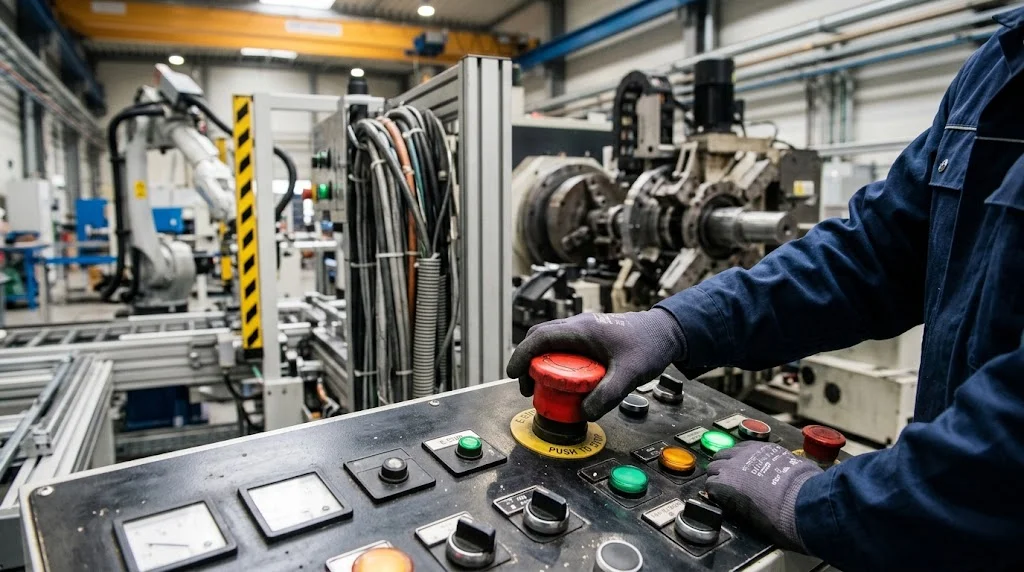
An emergency stop, commonly called an E-stop, is a safety control designed to halt dangerous machinery or processes rapidly. It is often a highly visible push button positioned near equipment or operator workstations. When pressed, it sends the system into a defined stop condition so that the hazard can be addressed.
Emergency stop buttons are intentionally designed to be easy to recognize and operate. In many industrial environments, operators should not need to navigate menus or perform complicated steps during an emergency. A simple physical control can provide a faster response when seconds matter.
An E-stop is not always equivalent to removing every source of power from a machine. Depending on system design, some circuits may remain energized for braking, monitoring, or controlled shutdown functions. This is why emergency stops should be understood as part of a wider safety architecture rather than a replacement for proper isolation procedures.
Kill Switches in Industrial Machinery
Industrial machines often contain powerful motors, cutting equipment, hydraulic systems, robotic arms, conveyors, or other components capable of causing serious damage if control is lost. Kill switches give operators a rapid way to interrupt operation. They are commonly integrated alongside guards, sensors, safety relays, and interlock systems.
A manufacturing line may have multiple emergency stop points positioned around different areas of equipment. This allows workers to stop the process without running to one central control panel. Larger systems may also connect multiple E-stops into a coordinated safety circuit.
After an emergency shutdown, equipment typically should not restart automatically merely because the button is released. A deliberate reset procedure may be required before normal operation resumes. This helps ensure that the cause of the shutdown has been investigated and that workers are prepared for machinery to start moving again.
Kill Switches in Cars and Other Vehicles
Vehicle kill switches can interrupt ignition, fuel delivery, electrical circuits, or another component required for an engine or drivetrain to operate. They may be installed for security, motorsport, maintenance, or emergency purposes. Some systems are factory-designed, while others are added later as aftermarket security measures.
Anti-theft kill switches make a vehicle harder to start even if someone gains access to the cabin or ignition system. The hidden control may interrupt a necessary circuit until the authorized driver activates it. However, vehicle modifications must be designed carefully so they do not create unexpected safety or reliability problems.
Racing vehicles may use clearly accessible electrical cutoff systems designed for emergencies. These allow drivers or rescue personnel to disable important electrical systems quickly after an incident. The design requirements differ significantly from a concealed anti-theft switch because accessibility and emergency response are higher priorities.
Motorcycle and Marine Engine Kill Switches
Motorcycles commonly include an engine stop switch on the handlebar that allows the rider to shut off the engine without reaching for the ignition key. This can be useful when rapid engine shutdown is needed. It operates as part of the motorcycle’s electrical or ignition control system.
Some motorcycles and recreational vehicles also use tether-style kill switches. A cord connects the rider or operator to a switch, and separation can trigger engine shutdown. This concept is especially valuable when an uncontrolled vehicle could continue moving after the operator falls away.
Boats and personal watercraft frequently use similar engine cutoff systems. If the operator is thrown from the controls, the tether can stop propulsion rather than allowing the craft to continue under power. These systems demonstrate how a simple kill switch can reduce risk through automatic response rather than relying on conscious action.
What Is a VPN Kill Switch?
A VPN kill switch is a cybersecurity feature that blocks internet traffic if the connection to the virtual private network unexpectedly fails. Without this protection, a device might automatically return to its normal internet connection. That could expose the user’s real IP address or transmit traffic outside the encrypted VPN tunnel.
When enabled, the kill switch monitors the status of the VPN connection. If the secure tunnel drops, it prevents selected applications or the entire device from accessing the internet. Normal connectivity resumes when the VPN reconnects or when the user intentionally disables the protective setting.
This feature is especially useful for users who depend on continuous VPN protection. However, implementation differs among VPN services and operating systems. Some kill switches operate only while the VPN application is running, while others use stricter network rules designed to prevent traffic leakage under a wider range of conditions.
Network Kill Switches and Cybersecurity
A network kill switch can disable connectivity when continued communication creates a security risk. Administrators may use network controls to isolate compromised devices, block suspicious connections, or contain an attack. Rapid isolation can limit how easily malware or unauthorized users move across connected systems.
In enterprise environments, this capability may be implemented through firewall rules, network access controls, switches, endpoint management systems, or automated security platforms. The objective is not always to shut down an entire network. Often, isolating one device or segment is enough to prevent further damage.
Automated security systems can also trigger network restrictions based on predefined indicators. For example, unusual behavior from an endpoint might cause it to be quarantined while analysts investigate. However, automation must be configured carefully because incorrect rules could accidentally disconnect legitimate devices or disrupt important business operations.
Kill Switches in Software and Cloud Applications
Software teams sometimes build kill switches into applications so problematic features can be disabled without shutting down the entire service. These controls are particularly valuable when a newly released feature produces errors, performance problems, or unexpected user behavior. Developers can deactivate the affected function while leaving unrelated parts of the application available.
Feature flags are commonly used to provide this type of control. A team can enable or disable a capability for selected users, environments, or regions through configuration rather than immediately changing the application code. In an emergency, the flag effectively acts as a software kill switch.
Teams may test shutdown behavior during a proof of concept before deploying a new system widely. A POC can help confirm whether a technical idea, control mechanism, or fallback approach works under realistic conditions. Testing these controls early reduces the chance of discovering critical limitations only after full deployment.
Remote Kill Switches
A remote kill switch allows a device, system, account, or service to be disabled without physical access. The command may be sent through a management console, cloud platform, cellular connection, network service, or specialized control system. Remote capability is useful when equipment is geographically distributed.
Businesses commonly manage fleets of computers and mobile devices using centralized administration tools. If a company-owned device is lost or stolen, administrators may be able to lock it, remove corporate access, or erase sensitive information remotely. Similar concepts are used in connected equipment and industrial management systems.
Remote control also introduces security requirements because unauthorized activation could itself become dangerous or disruptive. Strong authentication, encryption, access controls, logging, and administrative safeguards are therefore important. A remote kill switch should reduce risk rather than create an easy pathway for attackers to disable essential systems.
Kill Switches on Smartphones and Mobile Devices
Smartphones use kill-switch-like features primarily for theft prevention and data protection. Remote device management tools may allow an owner or administrator to lock a lost phone, display a message, remove access credentials, or erase stored information. These capabilities are especially valuable because mobile devices often contain significant personal or business data.
Organizations managing employee devices can apply additional controls through mobile device management platforms. If a worker leaves the company or a device becomes compromised, business applications and corporate accounts can be disabled remotely. In some setups, only organizational data is removed while personal information remains untouched.
These protections are different from physically destroying or permanently disabling the device. The primary objective is usually to prevent unauthorized access to information. Account authentication, device encryption, screen locking, remote management, and backup practices work together to provide much stronger protection than relying on one control alone.
Kill Switches in IoT and Smart Devices
Internet of Things devices include smart cameras, sensors, appliances, industrial monitors, access systems, and many other connected products. Because these devices communicate over networks, manufacturers or administrators may include controls that disable certain functions remotely. This can help contain security issues or stop malfunctioning equipment.
A smart device kill switch might block network access, deactivate a cloud service, disable a feature, or place the device into a restricted operating mode. In industrial IoT environments, similar controls can prevent a compromised endpoint from continuing to send commands or communicate with other operational systems.
However, remote shutdown capability must be designed with availability in mind. If a centralized server is compromised or incorrectly configured, large numbers of devices could potentially be affected simultaneously. Resilient systems therefore combine remote management with strong authentication, careful permissions, redundancy, and recovery procedures.
Kill Switches in Data Centers
Data centers contain servers, storage systems, networking equipment, cooling infrastructure, and electrical distribution systems that may require different forms of emergency control. Kill switches can help technicians isolate equipment experiencing electrical faults, overheating, security incidents, or other dangerous conditions. The design depends on what needs to be stopped.
Not every data center emergency should result in immediately cutting power to every server. Abruptly stopping equipment can interrupt services, damage data, or complicate recovery. Engineers therefore design layered shutdown procedures that may isolate only the affected rack, circuit, system, or application.
Software controls are equally important in modern data centers. Administrators may disable compromised accounts, block network paths, stop services, or remove workloads from production. Physical and digital kill switches therefore operate alongside monitoring, redundancy, backups, access management, and incident response procedures.
Automatic vs Manual Kill Switches
Manual kill switches require a person to recognize a problem and activate the control. Emergency stop buttons are a common example because a worker presses them after observing dangerous behavior. Manual controls are valuable when human judgment can identify risks that automated systems might not detect.
Automatic kill switches respond when sensors, software, or control systems detect predefined conditions. A machine may stop when a safety guard opens, a device may shut down when temperatures become excessive, or cybersecurity software may isolate an endpoint when malicious activity is detected. Response can occur without waiting for human intervention.
The strongest systems often use both approaches rather than choosing only one. Automation can respond quickly to predictable conditions, while humans can intervene when unusual circumstances occur. Combining sensors, safety logic, monitoring, manual controls, and recovery procedures creates multiple layers of protection against single points of failure.
Fail-Safe Design and Kill Switches
A fail-safe system is designed so certain failures move equipment toward a safer condition rather than leaving it operating dangerously. Kill switches can form part of this philosophy when loss of control power, broken wiring, or another fault causes a machine to stop. The exact approach depends on the hazards involved.
Engineers sometimes design control circuits so continued operation requires a healthy electrical path. If the circuit is interrupted by a broken wire or activated emergency stop, the machine cannot continue normally. This can make certain failures easier to detect because a disconnected safety circuit produces a shutdown rather than being silently ignored.
Fail-safe does not mean failure-proof. Every safety mechanism has assumptions, limitations, and potential failure modes. Proper design therefore includes risk assessment, testing, maintenance, inspection, redundancy where appropriate, and clear operational procedures rather than depending entirely on one kill switch.
Kill Switch vs Regular On/Off Switch
A normal on/off switch is primarily intended for routine operation. Users may turn a lamp, appliance, computer, or machine on and off as part of everyday use. Its design may prioritize convenience rather than immediate access during abnormal or dangerous conditions.
A kill switch is typically intended for rapid stopping when normal operation should not continue. It may be more visible, easier to reach, connected to additional safety circuitry, or designed so restarting requires a deliberate reset. These characteristics distinguish it from an ordinary power button.
The difference can also be conceptual rather than purely physical. A software application’s everyday log-out control is not generally called a kill switch, while an administrator control that instantly disables the service during a major security incident might be. Purpose and system behavior determine the classification.
Kill Switch vs Circuit Breaker
A circuit breaker protects electrical wiring and equipment from conditions such as excessive current or short circuits. It automatically opens the circuit when electrical current exceeds designed limits. Although this stops power flow, its primary purpose is electrical protection rather than serving as a general emergency control.
A kill switch is activated based on operational, safety, or security needs rather than solely electrical current. A worker may press one because machinery is behaving dangerously even though the electrical current remains completely normal. The two devices therefore respond to different kinds of problems.
Some systems contain both circuit breakers and emergency shutdown controls because each provides a different layer of protection. The breaker protects against electrical faults, while the kill switch helps stop equipment during broader hazards. One should not automatically be treated as a substitute for the other.
Kill Switch vs Safety Interlock
A safety interlock prevents or changes machine operation when a specific condition is not satisfied. For example, opening a protective guard may activate an interlock that stops dangerous movement. The worker does not necessarily need to press a separate emergency button.
A kill switch is more commonly associated with an intentional or triggered shutdown mechanism. Emergency stops give people direct control, while interlocks often respond automatically to changes in equipment conditions. Both approaches can appear within the same machine safety system.
Combining interlocks with emergency controls provides stronger protection because each addresses different situations. A guard interlock can stop machinery when access becomes possible, while an emergency stop allows intervention for hazards unrelated to the guard. Good safety engineering relies on multiple complementary controls.
Benefits of Using a Kill Switch
The most obvious benefit is rapid response. When a problem develops quickly, operators, administrators, or automated systems may need to stop activity before the normal shutdown process can finish. A properly designed kill switch reduces the time between detecting danger and taking protective action.
Kill switches can also help limit damage. Stopping a malfunctioning motor may protect equipment, while isolating a compromised computer can reduce the spread of malware. Disabling a buggy software feature may prevent further errors from affecting customers or corrupting important information.
Another advantage is greater operational control during incidents. Teams know they have a defined mechanism for placing a system into a safer or more manageable state. When combined with monitoring, documentation, training, and recovery procedures, kill switches can make emergency response more predictable and organized.
Limitations and Risks of Kill Switches
A kill switch is useful only if it works when needed. Poor maintenance, damaged wiring, software bugs, incorrect configuration, or inaccessible controls can undermine the system. Regular testing is therefore important in environments where emergency shutdown capability is considered critical.
False activation can also cause serious disruption. An incorrectly configured automated kill switch might stop production equipment, disconnect legitimate users, or disable an important application. Designers need to balance fast intervention against the consequences of shutting something down unnecessarily.
Security is another concern for remotely accessible kill switches. If attackers gain permission to use them, they could potentially disable devices, services, or infrastructure intentionally. Strong access controls, authentication, audit logs, segmentation, and clear authorization policies help reduce that risk.
How Kill Switches Are Tested
Testing verifies that a kill switch produces the expected result under controlled conditions. For physical systems, technicians may inspect wiring, activate the control, confirm that dangerous movement stops, and verify that the equipment does not restart unexpectedly. Testing procedures should reflect the specific system design.
Digital systems can be tested through simulations, staging environments, controlled failure scenarios, and incident-response exercises. Teams may intentionally disconnect a VPN, disable a service dependency, or simulate suspicious network behavior to see whether the kill mechanism activates as planned.
Testing should also examine recovery rather than focusing only on shutdown. Organizations need to know how equipment, applications, and connections can be restored safely after activation. Clear reset procedures reduce the chance of accidental restart or extended downtime following a genuine emergency.
Why Kill Switches Matter in Modern Technology
Technology has become increasingly connected, automated, and dependent on software. A malfunction can therefore affect far more than one isolated device. Networked systems, cloud services, smart equipment, and industrial automation can spread problems quickly when there is no reliable way to contain them.
Kill switches provide one form of containment by giving organizations a method to interrupt unwanted activity. Cybersecurity teams can isolate devices, developers can disable features, and engineers can stop machinery. The mechanisms differ, but the underlying principle of limiting consequences is remarkably consistent.
They are most effective when treated as part of a larger system rather than a standalone solution. Monitoring identifies the problem, a kill switch helps control it, and recovery procedures restore safe operation afterward. This layered approach makes modern systems more resilient when unexpected failures occur.
How to Use a Kill Switch Safely
Users should understand what a particular kill switch actually stops before relying on it. Some controls cut all power, while others stop only motion, data traffic, fuel delivery, or a specific software service. Incorrect assumptions can create additional danger during an emergency.
Workplaces should provide appropriate training so people know where emergency controls are located and when they should be used. Labels and accessibility also matter because an emergency control is less valuable if users cannot recognize or reach it quickly. Procedures should explain what happens after activation.
Digital kill switches need similar preparation. Administrators should document who is authorized to use them, what systems will be affected, and how services will be restored afterward. Carefully planned controls reduce the likelihood that an emergency response creates a larger operational problem.
Conclusion
A kill switch is a mechanism designed to stop a machine, device, connection, application, or process when continued operation becomes unsafe or undesirable. Depending on the application, it can interrupt power, fuel, network traffic, software functionality, or control signals. The central goal is rapid intervention.
Kill switches appear in industrial machinery, vehicles, motorcycles, boats, VPN applications, cybersecurity platforms, cloud services, smartphones, and IoT devices. Some require manual activation, while others respond automatically when predefined conditions are detected. Physical and digital designs increasingly work together in connected systems.
The presence of a kill switch does not eliminate risk on its own. Effective protection depends on proper design, secure implementation, regular testing, maintenance, monitoring, training, and reliable recovery procedures. When used as part of a broader safety or security strategy, a kill switch can provide an important layer of control.
FAQs About Kill Switches
What does a kill switch do?
A kill switch rapidly stops or disables a machine, device, software feature, network connection, or other process. It is usually used to reduce safety, security, operational, or equipment risks.
What is an example of a kill switch?
An emergency stop button on industrial machinery is a common example. A VPN feature that automatically blocks internet access when the encrypted connection fails is another widely used type of kill switch.
Is a kill switch the same as an emergency stop?
Not always. An emergency stop is a specific type of safety control, while the broader term kill switch can also describe digital, automotive, cybersecurity, network, and remote shutdown mechanisms.
What is a kill switch in cybersecurity?
In cybersecurity, a kill switch is a mechanism that stops network traffic, disables software, isolates devices, or restricts access when suspicious or dangerous activity is detected. It helps contain potential security incidents.
Can a kill switch turn itself on automatically?
Yes. Automated kill switches can activate when sensors or software detect predefined conditions such as excessive temperature, a failed VPN connection, unauthorized activity, or unsafe machine operation.